Flexibility in Programming: In-Person Onsite to Anywhere, Anytime
By Becky Mayhew, Director of Visitor Experiences, Glenna Lydick, Education and Programs Coordinator, and Tim Dukeshire, Educator, SEE Science Center
SEE Science Center is a small hands-on science museum located in Manchester, NH with six full-time staff and a service area stretching from Southern NH to Northern MA. During a normal year 13% of SEE’s visitation consists of school field trips, a large portion of which support Title 1 Schools. When “spring rush” went from packed to zero bookings in 2020, SEE staff knew that the museum had to fundamentally change its service model in order to continue to serve this key audience.
With the help of an IMLS CARES Act grant, SEE rewrote our field trip playbook, analyzing and restructuring each of our traditional programs to prioritize safety, flexibility and convenience for teachers and students. SEE now leads the State of New Hampshire in virtual programming and has conducted over 250 virtual programs in the first half of 2021 serving over 4,500 students. The Organization faced many challenges during this transition but through pilot programs and extensive evaluations SEE has grown its infrastructure to the point where we have now made virtual learning a permanent offering.
Building A Virtual Infrastructure: Planning, Equipment, Staffing
Since its inception, SEE has prided itself in being fully hands-on. Without in-person hands-on interaction, how could SEE be SEE in a virtual setting? What would differentiate SEE from larger institutions with greater resources in a digital landscape? After much debate, we determined that if SEE was going to go virtual, we had to go live. In person or virtual, we knew that live experiences with a presenter who actively engages with the student audience, answering the unexpected questions and creating a shared experience was what made our programs truly special.
We then had to take stock of all of the programs we offered previously to determine which lessons could translate to a virtual platform. We soon realized that some things that are fantastic in-person just don’t cut-it in virtual - they may be too small or too fast for the camera, too involved, or too tactile or too long. Length was a serious limiting factor, both due to student attention span and the new constraint of needing to fit content into a single class period. We had to determine the best way to truncate each program into smaller lessons and experiences while still hitting major delivery beats and wow moments.
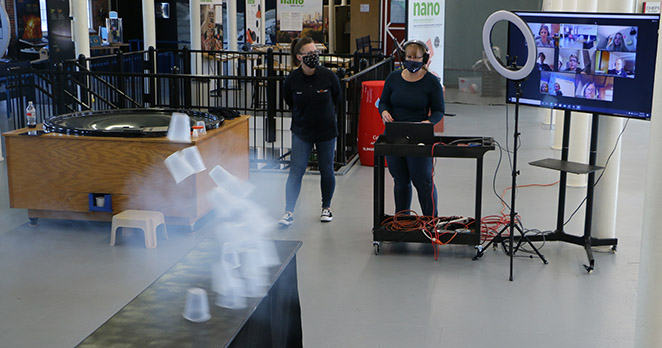
Once we knew what we wanted to do, the next step was figuring out the technology. We expended the resources and invested in quality equipment that would withstand, what we hoped, would be a very busy virtual schedule. Key to our purchases was ensuring that all technology could be dedicated to virtual programs so that it was always available for bookings, no matter which educator was presenting. Our purchase list included a laptop, web cams (a backup camera is a necessity), a boom mic, a lapel mic and a big screen TV for our presenter's to view the class as close to real size as possible. Through trial and error we slowly added more items to our set-up like a rolling cart to move our equipment set-up and extra materials like HDMI cables, extension cords and plenty of batteries for the microphones.
We learned quickly, that unlike other programs, a virtual program is a two-man job - one in front of the camera and one behind. With a three-person education staff that meant that two-thirds of our team was tied up for each virtual program. Keeping mindful of this was essential when it came to scheduling. We had to develop a combined calendar where each member could post their availability to speed up the booking process. We also had to cross-train so that in an emergency non-education staff could take over managing the technology.
Equity and Access: Barriers and Opportunities
Making programs as accessible as possible for everyone under the sun is hard, but doable. One of the main things that we wanted to make sure is that we made the process of booking and setting up a program as easy as possible for teachers and as safe as possible for students. Unless we made an effort to reduce technological barriers to access we would be unlikely to reach under resourced schools and we risked further disadvantaging those students that most needed our support.
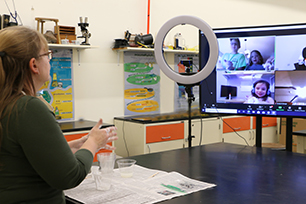
We achieved maximum uptake by being as accommodating as possible. We made sure that we could be available on any video conferencing software that was used by any school district. This allowed us to enter a teacher’s virtual classroom, using software they were already familiar with. It allowed administrators to quickly approve programs, because they could use their existing online student safety protocols. This also made it very easy for a teacher to transition from normal classwork, to a program, back to their normal instruction format. Students didn’t have to transfer from one platform to another, no one had to disconnect from their virtual classroom, and all a teacher had to do is send a link to set-up their booking. Although easy for teachers, this put a lot of the logistical strain on SEE. We had to develop a system to help teachers with connectivity issues, get names and numbers of students, contact numbers and emails for teachers and invite links. All of this had to be done in advance and shared with multiple presenters.
Once we had reduced barriers to booking, we started to identify and tackle issues of in-session equity. We adopted the technique of having our behind-the-camera presenter act as a program observer - watching the program and recording which students were responding and how. This became a great tool for staff to identify student participation patterns. Fairly early on, we noticed that students with screens off were less likely to be called on by a presenter or teacher. All presenters were made aware of these patterns so that they could consciously counteract the bias towards calling on the faces they could see. We also began to shift presentations to include more group questions, or group polls. Although we had originally used virtual platform polling features, we found that this technology could be difficult for teachers to manage and difficult for students to engage with depending on the strength of their internet connection. By having students contribute physical (thumbs-up/thumbs-down) or verbal (group shout) answers we found we could engage the whole class at a time and get everyone participating with fewer challenges.
Virtual in Practice: Techniques for Presenters
When presenting virtually it is good to be aware of the many different ways a student may communicate. For example, a student may not want to have their camera on, but they may want to answer via chat or by raising a virtual hand. It is easy to focus on the students you can see and the traditional raised hands, but a virtual presenter must be able to multi-task and acknowledge the various different methods of student response simultaneously.
Virtual is new for many teachers. Make sure to go over expectations with teachers beforehand - especially in regards to how much involvement you will need, or not need. Every museum educator has experienced an in-person field trip where the teacher is completely checked-out at some point in their career. In-person, a good presenter can step-in and manage the class, virtual can be much more complicated. Over the past year SEE presenters have had to navigate teachers who forgot they were on microphone, teachers struggling with technology and teachers distracting the class by doing other activities on camera. We have also had amazing teachers who helped call on students, drew connections with their curriculum and teachers that helped make all of the technology transitions a smooth as possible. As a virtual presenter don’t be afraid to tell everyone your expectations at the beginning of each session, take control of the class, just like you would in an in-person session.
Virtual has its benefits too. We have actually found that virtual can help build more personal connections than in-person programs. One aspect of virtual that all of the educators here at SEE have really enjoyed is being able to call on each student by their screen name, allowing us to have more personal interactions with the students. During an in-person program unless students are wearing name tags, we don’t get that opportunity. The ease of fitting virtual programs into class sessions has also allowed educators to visit with the same students multiple times throughout the year. This has changed the perception of SEE from a once a year field trip stop to a full-fledged community partner and helped us gain connections with individual students.
Final Thoughts
SEE, like many museums, was forced to quickly shift into virtual this past year. We were fortunate to have identified funding to help support this effort, but we attribute much of our success to our commitment to taking our time to plan, pilot and invest in the sustainability of this program. We would leave anyone seeking to transition to virtual a lesson echoed by many over this past year - be flexible and roll with it. Snafus will happen, there is no one-size fits all solution. Maintain a fluid atmosphere, take your time and learn from your (and others) mistakes.